
Free Job Application Tracker Spreadsheet
A free Google Sheets template that tracks every job application, reminds you when to follow up, and charts how your search is going.
Visualize Progress
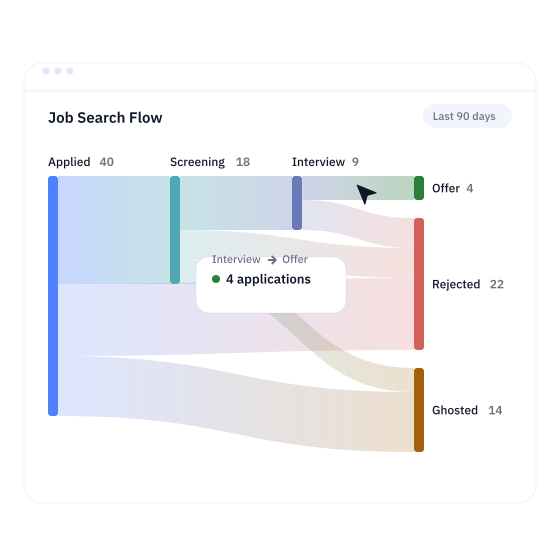
Generate a Sankey diagram of your whole search. See at a glance how applications move from Applied to screening, interviews and offers, and where they stall.
Timed Follow-Ups
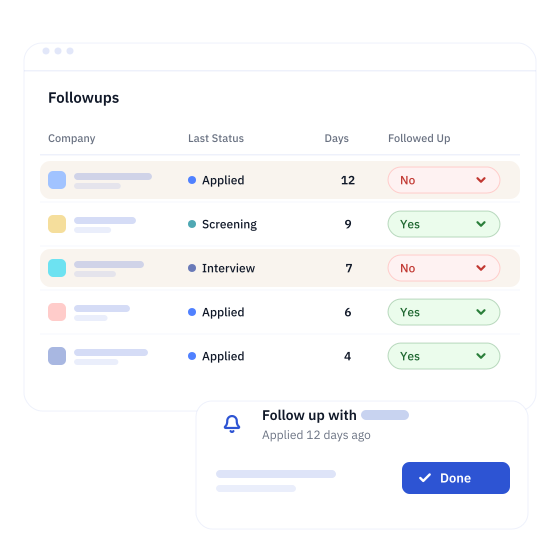
Set your own follow-up schedule and get timely reminders to follow up on your applications and interviews, so no opportunity goes quiet by accident.
Track Metrics
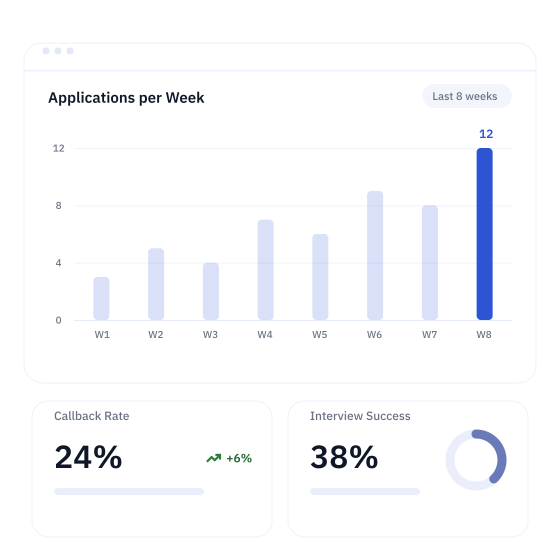
Track applications submitted per week, interview callback rates and interview success rates, so you can run your job search methodically and change course early.
Frequently Asked Questions
Generate Sankey diagram visualizations: See your entire job search flow at a glance. The Sankey diagram shows how applications progress through each stage of the hiring process, so you can see exactly where opportunities advance or stall.
Track job search metrics: Monitor applications submitted per week, interview callback rates and interview success rates. These numbers help you set realistic goals and understand how you're doing at each stage of the hiring funnel.
Get follow-up reminders: Never miss an opportunity. The spreadsheet tells you when it's time to follow up on an application and when to send a thank-you note.
- Go to File → Make a copy to save the spreadsheet to your own Google Drive. Skip this if you already made a copy with the Get the Google Sheet button.
- Allow the permissions the sheet asks for. Its scripts need them to run and to keep the spreadsheet up to date.
- Optional: customize the application statuses in the Customization sheet. Renaming the default statuses can break some automations, so it's usually best to leave them as they are.
- Optional: adjust the follow-up schedule in the Customization sheet to suit you.
- Delete the sample rows, then run Tracker Options → Clean Deleted Applications to start fresh.
- Add your jobs and update their statuses as you go. The first time you mark a job as Applied, the date is recorded automatically.
- Active applications that are due a follow-up appear in the Followups sheet, based on your schedule. It updates when you open or edit the spreadsheet, and you can refresh it any time with Tracker Options → Update Followups.
- When your search is over, clear the Tracker sheet and run Tracker Options → Clean Deleted Applications to reset it for next time. A cleanup also runs automatically every week.
Yes. You may modify and redistribute this spreadsheet under the terms of our open license. Give correct attribution, and don't sell or otherwise monetize it.
If you have any questions, write to us at [email protected].
Yes. If you want a more complete solution that also works with the tools that can boost your job search, try the free Dartiga Job Tracker.
It lets you attach resumes and job descriptions to each application and track everything on a Kanban board. Use it when you need something more versatile than a spreadsheet.
Can't find the answer you're looking for? Email [email protected].